Chapter 50: File I/O System Calls: lseek(), stat(), fstat(), lstat()
Chapter Objectives
Upon completing this chapter, you will be able to:
- Understand and manipulate the file offset of an open file descriptor using the
lseek()system call. - Retrieve detailed metadata about files, such as size, permissions, and timestamps, using the
stat(),fstat(), andlstat()system calls. - Differentiate between the
stat,fstat, andlstatfunctions, particularly in their handling of symbolic links. - Implement robust C programs that use file positioning and metadata to perform advanced file operations on an embedded Linux system.
- Debug common issues related to file I/O, such as incorrect file positioning and permission errors.
- Apply these system calls to solve practical problems in embedded applications, like managing data logs or verifying file integrity.
Introduction
We have established how to create, read, and write files using fundamental system calls like open(), read(), and write() in our journey through Linux system programming. These operations form the bedrock of all I/O, but they treat files as simple, sequential streams of bytes. In the world of embedded systems, this is often not enough. Consider a data logger on a remote environmental sensor. It might write thousands of data points to a single file every day. If you need to retrieve a specific record from the middle of the day, reading the entire file sequentially would be incredibly inefficient, wasting precious CPU cycles and power—two resources that are often scarce in embedded devices. Likewise, how does a system know if it has permission to write to a log file, or when a configuration file was last modified?
This is where the concepts of file positioning and metadata become critical. This chapter introduces the essential system calls that allow a program to move beyond simple sequential access and to query the underlying properties of a file. We will explore the lseek() system call, which acts like a cursor, allowing you to move the read/write position within a file to any desired location. This capability is the foundation for implementing record-based access, building simple databases, and efficiently parsing complex binary file formats. We will then delve into the stat() family of functions (stat(), fstat(), and lstat()), which serve as the system’s inquiry desk for files. These calls allow you to ask the kernel for a file’s “biography”—its size, ownership, permissions, modification times, and more. For an embedded system, this information is vital for tasks ranging from file system management and log rotation to security verification and over-the-air update mechanisms. By mastering these tools, you will unlock a more powerful and efficient way to interact with the file system, a skill indispensable for any embedded Linux developer.
Technical Background
At the heart of how the Linux kernel manages file I/O is a simple yet powerful abstraction: the file offset. Every time a process opens a file, the kernel maintains a pointer, often called the “current file offset” or “read/write pointer,” which indicates the location for the next read() or write() operation. When you read or write n bytes, this offset automatically advances by n bytes. This is why repeated calls to read() work their way through a file sequentially. The lseek() system call gives you direct control over this pointer, allowing you to move it to an arbitrary position within the file, thereby breaking the bonds of purely sequential access.
The lseek() System Call: Navigating Within a File
The lseek() system call is your primary tool for file positioning. Its function prototype, found in <unistd.h>, is deceptively simple:
off_t lseek(int fd, off_t offset, int whence);
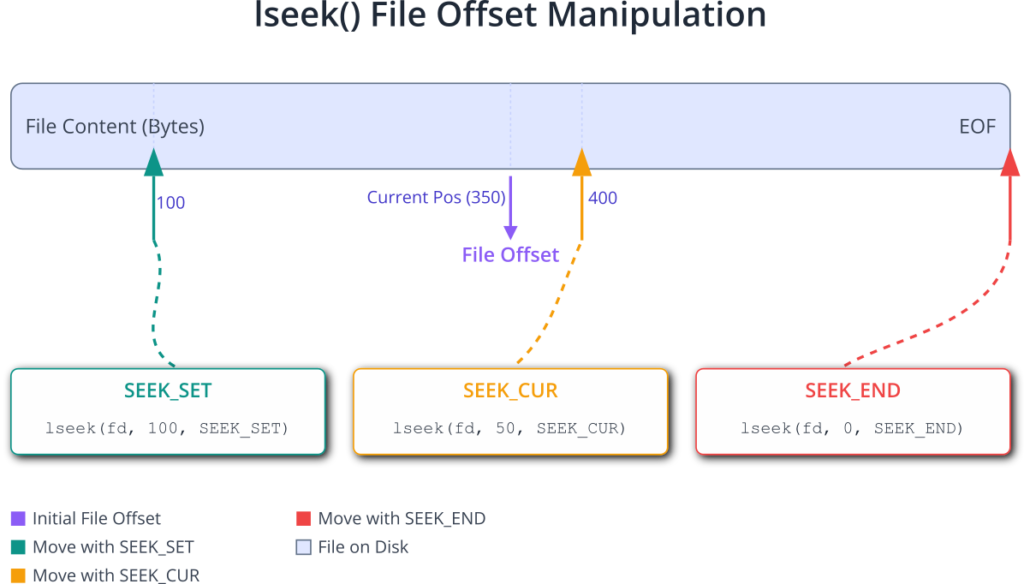
Let’s dissect its parameters. The first, fd, is the file descriptor returned by a successful open() call, identifying the file you wish to manipulate. The second parameter, offset, is a value of type off_t (a signed integer type defined to be large enough to hold file offsets) that specifies the distance to move. The third parameter, whence, is the crucial one; it defines the reference point from which the offset is measured. The POSIX standard defines three possible values for whence:
The return value of lseek() is the new file offset in bytes from the beginning of the file upon success. If an error occurs, it returns (off_t)-1 and sets errno to indicate the specific error. A common error is ESPIPE, which occurs if you try to use lseek() on a file descriptor that does not support seeking, such as a pipe, FIFO, or socket. These are true streams, not files stored on a block device, and the concept of a “position” within them is meaningless.
flowchart TD
    A["Call lseek(fd, offset, whence)"];
    B{"Is return value == (off_t)-1?"};
    C[/"<b>Error:</b><br>Call perror('lseek')<br>Handle error (e.g., exit)"/];
    D[("<b>Success:</b><br>The returned value is the<br>new file offset (in bytes).<br>Proceed with read/write.")]

    A --> B;
    B -- Yes --> C;
    B -- No --> D;

    classDef process fill:#0d9488,stroke:#0d9488,stroke-width:1px,color:#ffffff;
    classDef decision fill:#f59e0b,stroke:#f59e0b,stroke-width:1px,color:#ffffff;
    classDef error fill:#ef4444,stroke:#ef4444,stroke-width:1px,color:#ffffff;
    classDef success fill:#10b981,stroke:#10b981,stroke-width:2px,color:#ffffff;

    class A process;
    class B decision;
    class C error;
    class D success;
One powerful trick with lseek() is determining the size of a file without reading it. By calling lseek(fd, 0, SEEK_END);, you position the offset at the end of the file and the return value is precisely the size of the file in bytes. This is often more efficient than reading the entire file or even using the stat() system call if the file is already open.
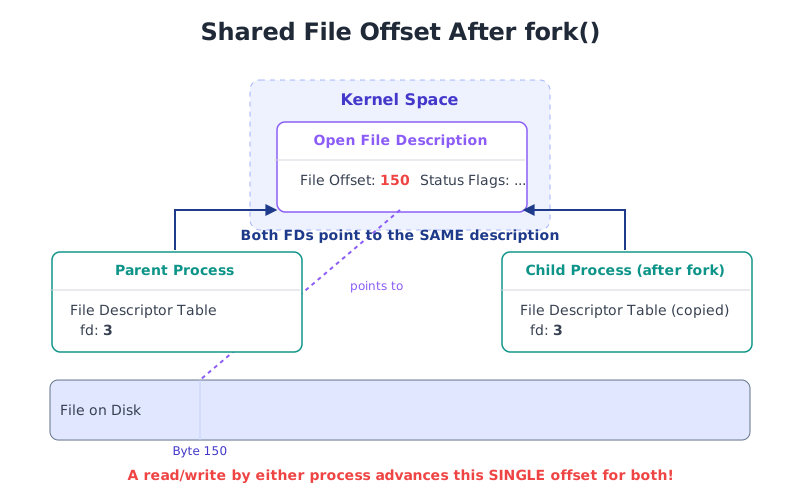
It’s also important to understand that the file offset is a property of the open file description in the kernel, not the process itself. If a process forks, the parent and child share the same open file description and thus the same file offset. A change to the offset by the parent will be seen by the child, and vice versa. This can be a source of subtle bugs if not handled with care.
The stat() Family: Uncovering File Metadata
While lseek() lets you navigate the contents of a file, the stat() family of system calls lets you inspect its properties. These properties, collectively known as metadata, are stored in a data structure called an inode (index node) on most Linux file systems like ext4. The inode contains nearly everything about a file except for its name and its actual data content. The file’s name is stored in the directory entry, which then points to the corresponding inode.
The three related system calls for retrieving this information are stat(), fstat(), and lstat(). They all populate the same data structure, struct stat, but differ in how they identify the target file.
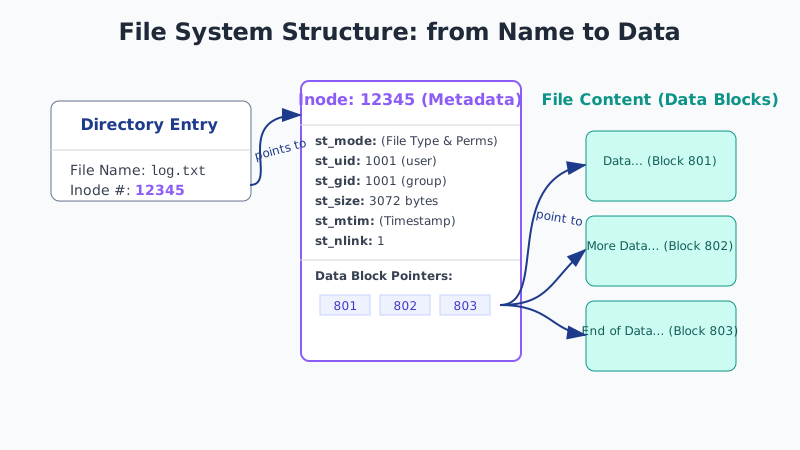
The struct stat is defined in <sys/stat.h> and is the cornerstone of file metadata retrieval. While the exact fields can vary slightly across UNIX-like systems, the POSIX standard guarantees the presence of several key members. On a modern Linux system, the structure looks something like this:
struct stat {
    dev_t     st_dev;     /* ID of device containing file */
    ino_t     st_ino;     /* Inode number */
    mode_t    st_mode;    /* File type and mode */
    nlink_t   st_nlink;   /* Number of hard links */
    uid_t     st_uid;     /* User ID of owner */
    gid_t     st_gid;     /* Group ID of owner */
    dev_t     st_rdev;    /* Device ID (if special file) */
    off_t     st_size;    /* Total size, in bytes */
    blksize_t st_blksize; /* Block size for filesystem I/O */
    blkcnt_t  st_blocks;  /* Number of 512B blocks allocated */
    struct timespec st_atim;  /* Time of last access */
    struct timespec st_mtim;  /* Time of last modification */
    struct timespec st_ctim;  /* Time of last status change */
};
Let’s explore the most important fields in the context of embedded systems:
st_mode: This is a bitmask that holds two crucial pieces of information: the file type and the file permissions. A set of macros is provided to test the file type. For example,S_ISREG()checks if it’s a regular file,S_ISDIR()for a directory,S_ISLNK()for a symbolic link, andS_ISCHR()orS_ISBLK()for character or block special files (device files), which are extremely common in embedded Linux. The lower bits ofst_modecontain the familiar read, write, and execute permissions for the owner, group, and others (e.g.,S_IRUSR,S_IWUSR,S_IXUSR).st_uidandst_gid: These fields identify the user and group that own the file. In an embedded context, this is critical for security. System configuration files should be owned byroot, and daemons should run with the minimum necessary privileges, which often involves setting up specific users and groups.st_size: This gives the size of the file in bytes. For a regular file, this is the amount of data it contains. For a symbolic link, it’s the length of the pathname it points to. For a directory, the size is implementation-dependent but is typically a multiple of the block size.st_mtim: This is atimespecstructure holding the time of the file’s last modification. This is invaluable for checking if a configuration file has been updated, if a data log is fresh, or for implementing caching mechanisms. Thetimespecstruct itself has two members:tv_sec(seconds since the Unix Epoch) andtv_nsec(nanoseconds).st_nlink: This field counts the number of hard links to the file. A file is only truly deleted from the file system when its link count drops to zero and no process has it open.
The Three Flavors of stat
Now, let’s look at the three functions that populate this structure.
- int stat(const char *pathname, struct stat *statbuf);The stat() call takes a file path (e.g., /etc/config.txt) as input. It retrieves the metadata for the file at that path and fills the statbuf structure. If the pathname refers to a symbolic link, stat() will “follow” the link and return the information for the file the link points to, not the link itself.
- int fstat(int fd, struct stat *statbuf);The fstat() call operates on an already open file descriptor (fd). This is often more efficient than stat() if you are already working with the file, as it avoids the overhead of the kernel having to look up the path name again. Like stat(), if the file descriptor refers to a symbolic link (which can happen if you open a link with O_PATH), fstat() will also follow it and report on the target file.
- int lstat(const char *pathname, struct stat *statbuf);The lstat() call is the special case. It also takes a file path as input, just like stat(). However, if pathname is a symbolic link, lstat() does not follow it. Instead, it returns information about the symbolic link file itself. This is the key difference and the primary reason for lstat()’s existence. If you need to know the size of the link file, its owner, or simply to confirm that a given path is a symbolic link, lstat() is the tool you must use.
graph TD
    subgraph User Input
        A[/"<b>Path:</b><br><i>/path/to/link</i>"/]
        B[/"<b>File Descriptor:</b><br><i>fd = open(/path/to/link, ...)</i>"/]
    end

    subgraph Filesystem
        C(<b>Symbolic Link</b><br><i>mylink</i>)
        D((<b>Target File</b><br><i>real_file.txt</i>))
        C -- "points to" --> D
    end

    subgraph System Calls
        subgraph "stat()"
            direction LR
            stat_in(Path) --> stat_call{"stat()"}
        end
        subgraph "fstat()"
            direction LR
            fstat_in(fd) --> fstat_call{"fstat()"}
        end
        subgraph "lstat()"
            direction LR
            lstat_in(Path) --> lstat_call{"lstat()"}
        end
    end

    subgraph "Result: struct stat for..."
        E[("Target File's<br>Metadata")]
        F[("Symbolic Link's<br>Metadata")]
    end

    A --> stat_in
    B --> fstat_in
    A --> lstat_in

    stat_call -- "Follows link" --> E
    fstat_call -- "Follows link" --> E
    lstat_call -- "<b>Does NOT</b> follow link" --> F

    classDef primary fill:#1e3a8a,stroke:#1e3a8a,stroke-width:2px,color:#ffffff;
    classDef process fill:#0d9488,stroke:#0d9488,stroke-width:1px,color:#ffffff;
    classDef success fill:#10b981,stroke:#10b981,stroke-width:2px,color:#ffffff;
    classDef special fill:#ef4444,stroke:#ef4444,stroke-width:1px,color:#ffffff;
    classDef system fill:#8b5cf6,stroke:#8b5cf6,stroke-width:1px,color:#ffffff;

    class A,B primary;
    class C,D system;
    class stat_call,fstat_call,lstat_call process;
    class E success;
    class F special;
In summary, lseek() provides the means to control the position of I/O operations within a file, enabling random access patterns that are essential for performance in many embedded applications. The stat family of calls provides the complementary ability to inspect a file’s metadata, which is fundamental for file management, security, and system integrity. Together, they represent a significant step up from basic sequential I/O, giving the developer fine-grained control over how the system interacts with the underlying file system.
Practical Examples
Theory provides the foundation, but true understanding comes from hands-on implementation. In this section, we will use the Raspberry Pi 5 to explore practical applications of lseek() and the stat() family. We will write C programs that you can compile and run directly on your device to see these system calls in action.
Tip: All examples can be compiled on your Raspberry Pi 5 using
gcc. For example, to compile a file namedmy_program.c, you would use the command:gcc -o my_program my_program.c.
Example 1: Using lseek() to Read a Specific Record
Imagine a data logging application that writes fixed-size records to a file. Each record represents a sensor reading and has a defined structure. Using lseek(), we can directly access any record without reading the preceding ones.
Scenario: A temperature sensor writes 16-byte records to temperatures.dat. We want to write a program to fetch the Nth record from this file.
File Structure (temperatures.dat):
This will be a binary file. We’ll first create a helper program to generate some sample data.
Data Generation Code (generate_data.c):
This program creates the temperatures.dat file with 10 sample records.
// generate_data.c
#include <stdio.h>
#include <stdlib.h>
#include <fcntl.h>
#include <unistd.h>
#include <time.h>

// Our fixed-size record structure
struct sensor_record {
    long timestamp;
    float temperature;
    char status_flags;
    char reserved[3]; // Padding for alignment
};

int main() {
    const char *filename = "temperatures.dat";
    int fd = open(filename, O_WRONLY | O_CREAT | O_TRUNC, 0644);
    if (fd == -1) {
        perror("open");
        return 1;
    }

    printf("Generating sample data file: %s\n", filename);
    printf("Record size: %ld bytes\n", sizeof(struct sensor_record));

    for (int i = 0; i < 10; i++) {
        struct sensor_record rec;
        rec.timestamp = time(NULL) + (i * 10); // Timestamps 10s apart
        rec.temperature = 20.0f + (i * 1.5f);  // Temp increases
        rec.status_flags = 0x01;

        if (write(fd, &rec, sizeof(struct sensor_record)) != sizeof(struct sensor_record)) {
            perror("write");
            close(fd);
            return 1;
        }
        printf("Wrote record %d\n", i);
    }

    printf("Data generation complete.\n");
    close(fd);
    return 0;
}
Record Reading Code (read_record.c):
This program takes a record number as a command-line argument and uses lseek() to read and display it.
// read_record.c
#include <stdio.h>
#include <stdlib.h>
#include <fcntl.h>
#include <unistd.h>
#include <time.h>

// The same record structure
struct sensor_record {
    long timestamp;
    float temperature;
    char status_flags;
    char reserved[3];
};

int main(int argc, char *argv[]) {
    if (argc != 2) {
        fprintf(stderr, "Usage: %s <record_number>\n", argv[0]);
        return 1;
    }

    int record_num = atoi(argv[1]);
    if (record_num < 0) {
        fprintf(stderr, "Record number must be non-negative.\n");
        return 1;
    }

    const char *filename = "temperatures.dat";
    int fd = open(filename, O_RDONLY);
    if (fd == -1) {
        perror("open");
        return 1;
    }

    // Calculate the offset
    off_t offset = record_num * sizeof(struct sensor_record);

    // Use lseek to position the file offset
    off_t new_pos = lseek(fd, offset, SEEK_SET);
    if (new_pos == (off_t)-1) {
        perror("lseek");
        close(fd);
        return 1;
    }

    // Read the record from the calculated position
    struct sensor_record rec;
    ssize_t bytes_read = read(fd, &rec, sizeof(struct sensor_record));
    if (bytes_read == -1) {
        perror("read");
        close(fd);
        return 1;
    }

    if (bytes_read == 0) {
        fprintf(stderr, "Error: Reached end of file. Record %d does not exist.\n", record_num);
    } else if (bytes_read < sizeof(struct sensor_record)) {
        fprintf(stderr, "Warning: Read a partial record. File may be corrupt.\n");
    } else {
        char time_buf[100];
        strftime(time_buf, sizeof(time_buf), "%Y-%m-%d %H:%M:%S", localtime(&rec.timestamp));
        printf("--- Record %d ---\n", record_num);
        printf("Position: %ld bytes\n", new_pos);
        printf("Timestamp:   %s\n", time_buf);
        printf("Temperature: %.2f C\n", rec.temperature);
        printf("Status Flags: 0x%02X\n", rec.status_flags);
    }

    close(fd);
    return 0;
}
flowchart TD
    Start([Start Program]);
    Input["Get Record Number (N)<br>from Command Line"];
    OpenFile["open('temperatures.dat', O_RDONLY)"];
    CheckOpen{File Opened Successfully?};

    CalcOffset["Calculate Offset:<br><i>offset = N * sizeof(record)</i>"];
    Seek["lseek(fd, offset, SEEK_SET)"];
    CheckSeek{Seek Successful?};

    Read["read(fd, &buffer, sizeof(record))"];
    CheckRead{Bytes Read > 0?};

    Display["Display Record Data:<br>Timestamp, Temperature, etc."];
    End([End Program]);

    ErrorOpen[/"Display 'open' error"/];
    ErrorSeek[/"Display 'lseek' error"/];
    ErrorRead[/"Display 'read' error or EOF"/];

    Start --> Input;
    Input --> OpenFile;
    OpenFile --> CheckOpen;
    CheckOpen -- Yes --> CalcOffset;
    CheckOpen -- No --> ErrorOpen --> End;

    CalcOffset --> Seek;
    Seek --> CheckSeek;
    CheckSeek -- Yes --> Read;
    CheckSeek -- No --> ErrorSeek --> End;

    Read --> CheckRead;
    CheckRead -- Yes --> Display --> End;
    CheckRead -- No --> ErrorRead --> End;

    classDef start-end fill:#1e3a8a,stroke:#1e3a8a,stroke-width:2px,color:#ffffff;
    classDef process fill:#0d9488,stroke:#0d9488,stroke-width:1px,color:#ffffff;
    classDef decision fill:#f59e0b,stroke:#f59e0b,stroke-width:1px,color:#ffffff;
    classDef error fill:#ef4444,stroke:#ef4444,stroke-width:1px,color:#ffffff;
    classDef success fill:#10b981,stroke:#10b981,stroke-width:2px,color:#ffffff;

    class Start,End start-end;
    class Input,OpenFile,CalcOffset,Seek,Read,Display process;
    class CheckOpen,CheckSeek,CheckRead decision;
    class ErrorOpen,ErrorSeek,ErrorRead error;
Build and Run Steps:
1. Compile the data generator:
gcc -o generate_data generate_data.c2. Run the generator:
./generate_datatemperatures.dat file in your current directory.
3. Compile the record reader:
gcc -o read_record read_record.c4. Run the reader to fetch a specific record (e.g., record 5):
./read_record 5Expected Output:
--- Record 5 ---
Position: 80 bytes
Timestamp:   2025-07-22 03:00:50
Temperature: 27.50 C
Status Flags: 0x01
This output demonstrates that lseek() successfully moved the file offset to 5 * 16 = 80 bytes before the read() call, allowing us to access the desired record directly.
Example 2: A Simple stat Implementation
Let’s build a utility that mimics the basic functionality of the stat command-line tool. This program will take a file path as an argument and print out its key metadata. This example highlights how to use the stat structure and the file type macros.
File Information Code (simple_stat.c):
// simple_stat.c
#include <stdio.h>
#include <stdlib.h>
#include <sys/stat.h>
#include <time.h>
#include <unistd.h>

// Helper function to describe file type
const char* get_file_type(mode_t mode) {
    if (S_ISREG(mode)) return "Regular File";
    if (S_ISDIR(mode)) return "Directory";
    if (S_ISLNK(mode)) return "Symbolic Link";
    if (S_ISCHR(mode)) return "Character Device";
    if (S_ISBLK(mode)) return "Block Device";
    if (S_ISFIFO(mode)) return "FIFO/Pipe";
    if (S_ISSOCK(mode)) return "Socket";
    return "Unknown Type";
}

int main(int argc, char *argv[]) {
    if (argc != 2) {
        fprintf(stderr, "Usage: %s <file_or_directory>\n", argv[0]);
        return 1;
    }

    const char *path = argv[1];
    struct stat file_stat;

    // Use lstat to get info. This won't follow symlinks.
    if (lstat(path, &file_stat) == -1) {
        perror("lstat");
        return 1;
    }

    printf("  File: %s\n", path);
    printf("  Size: %ld Bytes\n", file_stat.st_size);
    printf("  Type: %s\n", get_file_type(file_stat.st_mode));
    printf(" Inode: %ld\n", file_stat.st_ino);
    printf(" Links: %ld\n", file_stat.st_nlink);

    // Print permissions
    char perms[11];
    perms[0] = (S_ISDIR(file_stat.st_mode)) ? 'd' : '-';
    perms[1] = (file_stat.st_mode & S_IRUSR) ? 'r' : '-';
    perms[2] = (file_stat.st_mode & S_IWUSR) ? 'w' : '-';
    perms[3] = (file_stat.st_mode & S_IXUSR) ? 'x' : '-';
    perms[4] = (file_stat.st_mode & S_IRGRP) ? 'r' : '-';
    perms[5] = (file_stat.st_mode & S_IWGRP) ? 'w' : '-';
    perms[6] = (file_stat.st_mode & S_IXGRP) ? 'x' : '-';
    perms[7] = (file_stat.st_mode & S_IROTH) ? 'r' : '-';
    perms[8] = (file_stat.st_mode & S_IWOTH) ? 'w' : '-';
    perms[9] = (file_stat.st_mode & S_IXOTH) ? 'x' : '-';
    perms[10] = '\0';
    printf("Access: (%04o/%s)\n", file_stat.st_mode & 07777, perms);

    // Print Owner/Group IDs
    printf("   Uid: %d\n", file_stat.st_uid);
    printf("   Gid: %d\n", file_stat.st_gid);

    // Print timestamps
    char time_buf[100];
    strftime(time_buf, sizeof(time_buf), "%Y-%m-%d %H:%M:%S %z", localtime(&file_stat.st_atim.tv_sec));
    printf("Access: %s\n", time_buf);
    strftime(time_buf, sizeof(time_buf), "%Y-%m-%d %H:%M:%S %z", localtime(&file_stat.st_mtim.tv_sec));
    printf("Modify: %s\n", time_buf);
    strftime(time_buf, sizeof(time_buf), "%Y-%m-%d %H:%M:%S %z", localtime(&file_stat.st_ctim.tv_sec));
    printf("Change: %s\n", time_buf);

    return 0;
}
Build and Run Steps:
- Compile the program:
gcc -o simple_stat simple_stat.c - Create a test file and a symbolic link:
echo "hello world" > testfile.txtln -s testfile.txt mylink - Run
simple_staton the regular file:./simple_stat testfile.txt - Run
simple_staton the symbolic link:./simple_stat mylink - Run
simple_staton a directory:./simple_stat /etc - Run
simple_staton a device file:./simple_stat /dev/tty1
Expected Output for ./simple_stat mylink:
  File: mylink
  Size: 12 Bytes
  Type: Symbolic Link
 Inode: 123457
 Links: 1
Access: (0777/lrwxrwxrwx)
   Uid: 1000
   Gid: 1000
Access: 2025-07-22 03:05:10 +0300
Modify: 2025-07-22 03:05:10 +0300
Change: 2025-07-22 03:05:10 +0300
Notice that because we used lstat(), the type is correctly identified as “Symbolic Link” and the size is 12 bytes—the length of the string “testfile.txt”. If we had used stat(), it would have reported the details of testfile.txt instead. This example clearly illustrates the critical difference between the two calls.
Common Mistakes & Troubleshooting
When working with file positioning and metadata, developers often encounter a few common pitfalls. Understanding these ahead of time can save hours of debugging.
Exercises
These exercises are designed to reinforce the concepts of file positioning and metadata retrieval. Attempt them on your Raspberry Pi 5.
- File Size Calculator:
- Objective: Write a C program named
filesizethat takes a filename as a command-line argument and prints its size in bytes. - Guidance: You must implement this in two ways within the same program:
- Using
lseek()withSEEK_ENDon an open file descriptor. - Using
stat()and retrieving thest_sizemember.
- Using
- Verification: The output from both methods should be identical. Compare your program’s output with the
ls -lcommand.
- Objective: Write a C program named
- Log Appender:
- Objective: Create a program
logappendthat takes a string as an argument and appends it as a new line to a file namedapp.log. - Guidance: Open the file using the
O_RDWR | O_CREATflags. Uselseek()to position the file offset to the end of the file before everywrite(). This ensures that even if other processes are writing to the log, your message will always be correctly appended. - Verification: Run the program multiple times with different messages. The
app.logfile should contain all messages in the correct order.
- Objective: Create a program
- Find Largest File:
- Objective: Write a program
findlargethat takes a directory path as an argument and recursively finds the largest regular file within that directory and its subdirectories. - Guidance: You will need to use functions for directory traversal (e.g.,
opendir(),readdir(),closedir()). For each entry, uselstat()to check if it’s a regular file or a directory. If it’s a file, get its size. If it’s a directory, make a recursive call. Keep track of the path and size of the largest file found so far. - Verification: Run your program on
/usr/includeand compare the result with what you might find using shell commands likefind /usr/include -type f -printf "%s %p\n" | sort -nr | head -1.
- Objective: Write a program
- Symbolic Link Inspector:
- Objective: Write a tool
linkstatthat takes a path as an argument. The program should identify if the path is a symbolic link. If it is, it should print information about the link itself (usinglstat()) and then information about the file the link points to (usingstat()). If the path is not a symbolic link, it should just print itsstat()information. - Guidance: First, call
lstat()on the path. Check thest_modefield withS_ISLNK(). If it’s a link, print thelstatdata. Then, callstat()on the same path to get the target’s data. If it’s not a link, just callstat()and print the results. - Verification: Create a symbolic link and run your tool on it. Then run it on a regular file and a directory to see the different outputs.
- Objective: Write a tool
- File Hole Puncher:
- Objective: Create a program
punchholethat creates a sparse file. It should take a filename and two numbers,offsetandlength, as arguments. The program should create a file, write 1KB of data at the beginning, then uselseek()to jump forward byoffsetbytes, and write another 1KB of data. - Guidance: Use
lseek(fd, offset, SEEK_CUR)to create the gap. After creating the file, usels -lhto see its apparent size anddu -hto see its actual disk usage. - Verification: The apparent size reported by
lsshould be roughly2KB + offset. The actual disk usage reported bydushould be much smaller, typically just a few blocks (e.g., 8K), because the “hole” does not consume disk space.
- Objective: Create a program
Summary
- File Offset: The Linux kernel maintains a file offset for each open file, indicating the position for the next read or write. This offset is shared between parent and child processes after a
fork(). lseek()System Call: Provides direct control over the file offset, allowing for random access to file contents. It usesSEEK_SETfor absolute,SEEK_CURfor relative, andSEEK_ENDfor end-of-file positioning.- File Metadata: File properties like size, permissions, and timestamps are stored in inodes and can be retrieved using the
stat()family of system calls. struct stat: This structure is the container for all file metadata returned by thestat()calls. Key fields includest_mode(type and permissions),st_size(size in bytes),st_uid(owner), andst_mtim(modification time).stat(),fstat(), andlstat(): These three functions retrieve file metadata.stat()uses a path and follows symbolic links.fstat()uses an open file descriptor and also follows links.lstat()uses a path but does not follow symbolic links, providing information about the link itself.- Practical Applications: These system calls are fundamental for building efficient and robust embedded applications, including data loggers, configuration managers, file system utilities, and security-monitoring tools.
Further Reading
- Linux man-pages: The official documentation is the most authoritative source. https://man7.org/linux/man-pages/
man 2 lseekman 2 statman 2 fstatman 2 lstat
- The Linux Programming Interface by Michael Kerrisk. Chapters 4 and 5 provide an exhaustive treatment of file I/O, and Chapter 15 covers file attributes in great detail.
- Advanced Programming in the UNIX Environment by W. Richard Stevens and Stephen A. Rago. A classic text that provides deep insights into the behavior of these system calls across various UNIX-like systems.
- POSIX.1-2017 Standard: The official standard defining the behavior of these functions. You can find the specifications for
lseek()andstat()on the Open Group’s website. - Raspberry Pi Documentation: While not specific to these system calls, the official hardware and software documentation can provide context for how the underlying file systems are used on the device. https://www.raspberrypi.com/documentation/
- “How to use lseek” – GeeksforGeeks: A good tutorial with simple examples that can serve as a quick reference. https://www.geeksforgeeks.org/cpp/lseek-in-c-to-read-the-alternate-nth-byte-and-write-it-in-another-file/
- LWN.net: An excellent source for deep dives into kernel-level implementation details and the history behind certain system call behaviors. Searching the archives for
lseekorstatcan yield fascinating articles.