Chapter 113: RESTful API Design and Implementation
Chapter Objectives
By the end of this chapter, you will be able to:
- Understand and apply core REST principles for designing APIs hosted on an ESP32.
- Design resource-oriented URIs that are intuitive and follow best practices.
- Implement HTTP request handlers for GET, POST, PUT, and DELETE methods to create CRUD (Create, Read, Update, Delete) operations for your ESP32’s resources.
- Effectively use JSON for request payloads and response bodies in your ESP32-hosted APIs.
- Parse incoming JSON data and generate JSON responses using the cJSON library.
- Understand basic API versioning strategies.
- Consider essential security aspects when exposing an API from your ESP32.
- Distinguish between serving web pages (Chapter 112) and providing programmatic API endpoints.
Introduction
In the preceding chapters, you’ve learned how the ESP32 can act as an HTTP client to consume web services (Chapter 111) and how it can function as an HTTP server to host web pages (Chapter 112). This chapter takes the server concept further by focusing on designing and implementing RESTful APIs directly on the ESP32.
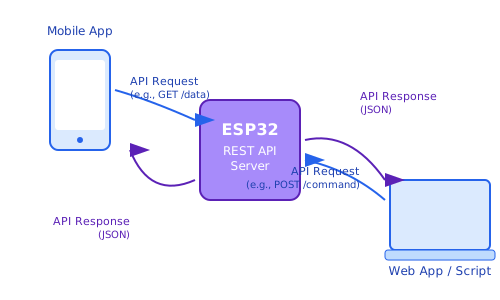
Instead of just serving HTML pages for human interaction, a RESTful API allows your ESP32 to offer a structured, programmatic interface. This means other software applications, scripts, or even other microcontrollers can interact with your ESP32 in a standardized way—to retrieve sensor data, send commands, update configurations, or manage resources it controls. For example, a mobile application could fetch real-time temperature data from an ESP32, or a central home automation hub could instruct an ESP32 to turn a light on or off, all via well-defined API calls over the local network.
Mastering RESTful API design on an embedded device like the ESP32 significantly enhances its capabilities for integration into larger systems and enables more sophisticated local network interactions.
Prerequisite Note: This chapter builds directly on the concepts and
esp_http_servercomponent introduced in Chapter 112. A solid understanding of Chapter 112 is essential. Familiarity with JSON and basic REST principles (Chapter 111) is also highly beneficial.
Theory
Recap: REST Principles from a Server’s Perspective
As a quick refresher from Chapter 111, REST (Representational State Transfer) is an architectural style. When designing an API on your ESP32 to be RESTful, you should adhere to these key principles:
- Client-Server Architecture: Your ESP32 is the server, managing resources and exposing them via the API. Clients (other applications) make requests to these resources.
- Statelessness: Each request from a client to the ESP32 server must contain all information needed to understand and process the request. The ESP32 server should not store any client context (session state) between requests specifically for the API interaction.
- Cacheability: Responses can indicate if they are cacheable, though for dynamic data from an ESP32, responses are often marked non-cacheable.
- Uniform Interface: This is crucial for API design and involves:
- Resource Identification (URIs): Resources (e.g., a specific sensor, an LED’s state, a configuration setting) are identified by Uniform Resource Identifiers (URIs).
- Manipulation of Resources Through Representations: Clients interact with resources by exchanging representations (typically JSON) of these resources.
- Self-descriptive Messages: Requests and responses use standard HTTP methods, status codes, and media types (like
application/json) to be self-explanatory. - HATEOAS (Hypermedia as the Engine of Application State): (Optional for simple ESP32 APIs) Responses can include links to related actions/resources.
%%{ init: { 'flowchart': { 'curve': 'basis' } } }%%
graph TD
    subgraph Client Application
        C["Client App <br>(e.g., Mobile/Web App, Script)"]
    end

    subgraph Network ["Local Network (Wi-Fi/Ethernet)"]
        direction LR
        Request["HTTP Request <br>(GET /sensors/temp)"]
        Response["HTTP Response <br>(200 OK + JSON Data)"]
    end

    subgraph ESP32 Server
        S_HTTP[ESP32 HTTP Server <br>esp_http_server]
        S_LOGIC["API Handler Logic <br>(Process request, access hardware/data)"]
        S_RES["Resource <br>(Sensor, LED, Config)"]
    end

    C -- Request --> S_HTTP
    S_HTTP --> S_LOGIC
    S_LOGIC -- Interacts with --> S_RES
    S_LOGIC -- Prepares data --> S_HTTP
    S_HTTP -- Response --> C

    %% Styling
    classDef default fill:#transparent,stroke:#888,stroke-width:1px,color:#333;
    classDef clientNode fill:#DBEAFE,stroke:#2563EB,stroke-width:1px,color:#1E40AF
    classDef serverNode fill:#EDE9FE,stroke:#5B21B6,stroke-width:2px,color:#5B21B6
    classDef resourceNode fill:#FEF3C7,stroke:#D97706,stroke-width:1px,color:#92400E
    classDef networkNode fill:#E0F2FE,stroke:#0EA5E9,stroke-width:1px,color:#0284C7

    class C clientNode
    class S_HTTP,S_LOGIC serverNode
    class S_RES resourceNode
    class Request,Response networkNode
Resource Naming and URI Design
Effective URI design is fundamental to a clear and usable REST API.
- Use Nouns, Not Verbs: URIs should identify resources (nouns), not actions (verbs). The HTTP method (GET, POST, PUT, DELETE) specifies the action.
- Good:
/sensors/temperature,/lights/livingroom - Bad:
/getTemperatureSensor,/setLivingroomLight
- Good:
- Use Plural Nouns for Collections: For resources that represent a collection of items.
- Good:
/alerts(a collection of all alerts) - Good:
/users
- Good:
- Use Singular Nouns for Specific Instances (often with an ID):
- Good:
/alerts/{alertId}(a specific alert) - Good:
/sensors/temperature/kitchen(a specific temperature sensor in the kitchen)
- Good:
- Maintain a Clear Hierarchy: Use
/to indicate hierarchical relationships.- Example:
/devices/{deviceId}/settings/network
- Example:
- Be Consistent: Use lowercase letters, and use hyphens (
-) to separate words in URI paths if needed (though underscores_are also seen, hyphens are often preferred). Avoid spaces or special characters that require URL encoding. - Avoid File Extensions: URIs should represent resources, not files. The
Content-Typeheader indicates the format of the representation (e.g.,application/json).- Good:
/users/123 - Bad:
/users/123.json
- Good:
Best Practices for RESTful URI Design.
%%{ init: { 'flowchart': { 'htmlLabels': true } } }%%
graph LR
    subgraph Good URI Design Practices
        direction LR
        N1["<b>Use Nouns, Not Verbs</b><br><br><i>Good:</i> /sensors/temperature<br><i>Good:</i> /lights/livingroom<br><br><span style='color:#DC2626;'><i>Bad:</i> /getTemperatureSensor</span><br><span style='color:#DC2626;'><i>Bad:</i> /setLivingroomLight</span>"]
        N2["<b>Plural for Collections</b><br><br><i>Good:</i> /alerts<br><i>Good:</i> /users"]
        N3["<b>Singular or ID for Specific Instances</b><br><br><i>Good:</i> /alerts/{alertId}<br><i>Good:</i> /sensors/temperature/kitchen"]
        N4["<b>Clear Hierarchy with /</b><br><br><i>Good:</i> /devices/{deviceId}/settings/network"]
        N5["<b>No File Extensions</b><br><br><i>Good:</i> /users/123<br><br><span style='color:#DC2626;'><i>Bad:</i> /users/123.json</span>"]
    end

    %% Styling - using a simpler approach for text boxes
    classDef default fill:#transparent,stroke:#888,stroke-width:1px,color:#333;
    classDef goodPractice fill:#DBEAFE,stroke:#2563EB,stroke-width:1px,color:#1E40AF,padding:10px
    class N1,N2,N3,N4,N5 goodPractice
HTTP Methods for CRUD Operations
REST APIs leverage standard HTTP methods to perform Create, Read, Update, and Delete (CRUD) operations on resources.
| HTTP Method | CRUD Operation | Typical Use Case on ESP32 API | Idempotent? | Safe? |
|---|---|---|---|---|
GET |
Read | Retrieve sensor state (e.g., GET /sensors/temperature), configuration, or list of resources. |
Yes | Yes |
POST |
Create | Create a new resource (e.g., POST /alerts with alert data), log an event, send a command that results in a new entity. |
No | No |
PUT |
Update/Replace | Update an existing resource completely (e.g., PUT /lights/livingroom/state with new state). Can create if resource doesn’t exist (upsert). |
Yes | No |
DELETE |
Delete | Remove a resource (e.g., DELETE /alerts/{alertId}). |
Yes | No |
PATCH |
Partial Update | Apply partial modifications to an existing resource (e.g., update only LED brightness). Often simplified to PUT on embedded systems. |
No | No |
- Idempotent: An operation is idempotent if making the same request multiple times has the same effect as making it once. GET, PUT, and DELETE are typically idempotent. POST is not.
- Safe: An operation is safe if it does not alter the state of the server (i.e., it’s read-only). GET and HEAD are safe methods.
HTTP Status Codes for API Responses
Using appropriate HTTP status codes is crucial for clients to understand the outcome of their API requests.
Common Success Codes (2xx):
200 OK: Standard response for successful GET, PUT, PATCH requests. Response body usually contains the requested or updated resource.201 Created: The request has been fulfilled and resulted in a new resource being created (typically for POST). The response body may contain the representation of the new resource, and aLocationheader might point to its URI.204 No Content: The server successfully processed the request but there is no content to return (typically for DELETE requests or PUT requests that don’t return the resource body).
Common Client Error Codes (4xx):
400 Bad Request: The server cannot process the request due to a client error (e.g., malformed JSON, invalid parameters).401 Unauthorized: Authentication is required and has failed or has not yet been provided.403 Forbidden: The server understood the request, but is refusing to authorize it. The client may not have the necessary permissions.404 Not Found: The requested resource could not be found on the server.405 Method Not Allowed: The HTTP method used in the request (e.g., POST) is not supported for the requested URI. TheAllowheader should be sent back with a list of supported methods.409 Conflict: The request could not be completed due to a conflict with the current state of the resource (e.g., trying to create a resource that already exists with a unique identifier).415 Unsupported Media Type: The server is refusing to accept the request because the payload format (e.g.,Content-Type) is in an unsupported format.
Common Server Error Codes (5xx):
500 Internal Server Error: A generic error message, given when an unexpected condition was encountered by the server and no more specific message is suitable.503 Service Unavailable: The server is currently unable to handle the request due to temporary overloading or maintenance.
| Code Range / Code | Meaning / Category | Common Use Cases on ESP32 API |
|---|---|---|
| 2xx Success | The request was successfully received, understood, and accepted. | |
200 OK |
Successful Request | Standard response for successful GET, PUT, PATCH. Body contains requested/updated resource. |
201 Created |
Resource Created | Successful POST that resulted in a new resource. Body may contain new resource, Location header may point to it. |
204 No Content |
Successful, No Body | Successful DELETE, or PUT/POST that doesn’t return data. No response body. |
| 4xx Client Errors | The request contains bad syntax or cannot be fulfilled. | |
400 Bad Request |
Malformed Request | Invalid JSON payload, missing parameters, invalid parameter values. |
401 Unauthorized |
Authentication Failed | Missing, invalid, or insufficient API key/token or credentials. |
403 Forbidden |
Authorization Failed | Authenticated client does not have permission to access the resource/perform action. |
404 Not Found |
Resource Not Found | Requested URI or resource (e.g., /sensors/nonexistent_id) does not exist. |
405 Method Not Allowed |
HTTP Method Not Supported | Using POST on a URI that only supports GET. Allow header should list supported methods. |
409 Conflict |
Request Conflicts with State | Trying to create a resource that already exists with a unique ID. |
415 Unsupported Media Type |
Payload Format Not Supported | Client sent data in a format server doesn’t accept (e.g., XML instead of JSON). |
| 5xx Server Errors | The server failed to fulfill an apparently valid request. | |
500 Internal Server Error |
Generic Server Error | Unexpected condition on ESP32 (e.g., unhandled cJSON error, peripheral failure). Avoid for client errors. |
503 Service Unavailable |
Server Overloaded/Down | ESP32 is temporarily unable to handle request (e.g., too busy, during maintenance/reboot). |
Data Formats: JSON for APIs
While REST is format-agnostic, JSON (JavaScript Object Notation) is the de facto standard for modern REST APIs due to its simplicity, human-readability, and ease of parsing.
sequenceDiagram
    actor Client
    participant ESP32_HTTP_Server as ESP32 HTTP Server
    participant ESP32_Handler as API Handler (Your Code)
    participant CJSON_Lib as cJSON Library

    Client->>+ESP32_HTTP_Server: POST /api/resource <br>(Body: "{ \"key\": \"value\" }", <br>Content-Type: application/json)
    ESP32_HTTP_Server->>+ESP32_Handler: Pass request data (raw string)
    ESP32_Handler->>+CJSON_Lib: cJSON_Parse(raw_json_string)
    CJSON_Lib-->>-ESP32_Handler: cJSON object (parsed_data)
    Note over ESP32_Handler: Process parsed_data,<br>perform actions
    ESP32_Handler->>+CJSON_Lib: cJSON_CreateObject(), cJSON_Add...()
    CJSON_Lib-->>-ESP32_Handler: cJSON object (response_data)
    ESP32_Handler->>+CJSON_Lib: cJSON_PrintUnformatted(response_data)
    CJSON_Lib-->>-ESP32_Handler: char* json_response_string
    ESP32_Handler->>-ESP32_HTTP_Server: Send json_response_string, <br>Set Content-Type: application/json
    ESP32_HTTP_Server-->>-Client: HTTP 200 OK <br>(Body: "{ \"status\": \"success\" }")
- Requests: For POST, PUT, and PATCH requests that send data to the ESP32, the client should typically send a JSON object in the request body and set the
Content-Typeheader toapplication/json. - Responses: The ESP32 API should typically send JSON objects in the response body for GET requests or successful POST/PUT requests, and set the
Content-Typeheader toapplication/json.
Using cJSON on ESP32:
The ESP-IDF includes the cJSON library, which is a lightweight and efficient JSON parser and generator written in C.
- Parsing JSON (Request Body):
// Assuming 'buffer' contains the JSON string from httpd_req_recv()
cJSON *root = cJSON_Parse(buffer);
if (root) {
    const cJSON *name_item = cJSON_GetObjectItemCaseSensitive(root, "name");
    if (cJSON_IsString(name_item) && (name_item->valuestring != NULL)) {
        ESP_LOGI(TAG, "Parsed name: %s", name_item->valuestring);
    }
    const cJSON *value_item = cJSON_GetObjectItemCaseSensitive(root, "value");
    if (cJSON_IsNumber(value_item)) {
        ESP_LOGI(TAG, "Parsed value: %d", value_item->valueint);
    }
    cJSON_Delete(root); // IMPORTANT: Always free the cJSON object
} else {
    ESP_LOGE(TAG, "Error parsing JSON: %s", cJSON_GetErrorPtr());
    // Send 400 Bad Request
}- Generating JSON (Response Body):
cJSON *root = cJSON_CreateObject();
cJSON_AddStringToObject(root, "status", "success");
cJSON_AddNumberToObject(root, "temperature", 25.5);
cJSON_AddBoolToObject(root, "led_on", true);

char *json_string = cJSON_PrintUnformatted(root); // Or cJSON_Print() for formatted
if (json_string) {
    httpd_resp_set_type(req, "application/json");
    httpd_resp_send(req, json_string, HTTPD_RESP_USE_STRLEN);
    free(json_string); // IMPORTANT: Always free the generated string
}
cJSON_Delete(root); // IMPORTANT: Always free the cJSON object
API Versioning
As your API evolves, you might introduce breaking changes. Versioning allows existing clients to continue using an older, stable version of the API while new clients can use the new version. Common strategies:
| Strategy | Example | Pros | Cons/Considerations for ESP32 |
|---|---|---|---|
| URI Versioning (Most Common) | GET /api/v1/sensorsGET /api/v2/sensors |
– Clear and explicit. – Easy to route with esp_http_server.– Widely understood. |
– Can lead to more URI handlers to maintain. – Recommended for ESP32 due to simplicity. |
| Query Parameter Versioning | GET /api/sensors?version=1GET /api/sensors?version=2 |
– Keeps base URI clean. – Single handler can manage versions. |
– Version might be missed by clients. – Requires parsing query params in handler logic (e.g., httpd_req_get_url_query_str).– Can make caching more complex (less of an ESP32 concern). |
| Custom Header Versioning | Client sends header:X-API-Version: 1 orAccept: application/vnd.company.v1+json |
– Keeps URI very clean. – Good for media type versioning. |
– Version is not visible in URI. – Requires header parsing ( httpd_req_get_hdr_value_str).– Can be less intuitive for simple clients. |
For ESP32-hosted APIs, URI versioning (/api/v1/...) is often the simplest and most practical approach.
Security Considerations
Exposing an API, even on a local network, has security implications.
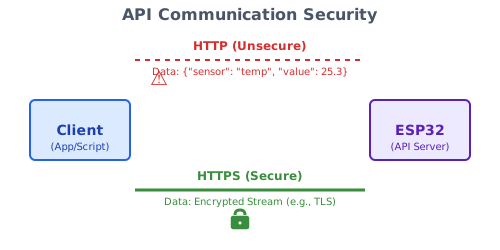
- HTTPS: Always prefer HTTPS over HTTP if sensitive data is exchanged or if control operations are exposed. This encrypts the communication. Refer to Chapter 112 for setting up an HTTPS server with self-signed certificates. While self-signed certs cause browser warnings, they still provide encryption for programmatic clients that can be configured to trust them or ignore the warning for local use.
- Authentication: Who is allowed to access the API?
| Method | Description | How it Works (Client & ESP32) | Pros for ESP32 | Cons for ESP32 |
|---|---|---|---|---|
| No Authentication | Open access. | Client makes request directly. ESP32 processes all requests. | – Simplest to implement. | – Highly insecure. Only for non-sensitive data on a fully trusted local network. |
| Basic Authentication | Username/password. | Client sends Authorization: Basic base64(user:pass) header. ESP32 (with CONFIG_ESP_HTTP_SERVER_ENABLE_BASIC_AUTH) decodes and validates. |
– Standardized. | – Sends credentials in plain text (Base64 is not encryption). – Requires HTTPS to be secure. – IDF component handles decoding. |
| API Keys/Tokens | Pre-shared secret. | Client sends key in a custom header (e.g., X-API-Key: your_secret_key) or query parameter. ESP32 handler code retrieves and validates the key. |
– Relatively simple to implement in handler logic. – More secure than no auth if key is kept secret. – Flexible key management (can be stored in NVS). |
– Key is static unless rotated. – Still vulnerable if not over HTTPS (key sent in plain text). – Custom implementation for validation. – Good balance for local ESP32 APIs with HTTPS. |
| OAuth 2.0 / JWT | Token-based auth framework. | Complex flow involving authorization server, resource server. Client obtains token, sends in Authorization: Bearer <token> header. |
– Very secure and flexible. | – Generally overkill and too complex for typical ESP32-hosted local APIs. – Significant resource overhead (code size, memory, processing). |
%%{ init: { 'flowchart': { 'curve': 'basis' } } }%%
graph TD
    A[Incoming Request to Protected API Endpoint] --> B{"Header <i>X-API-Key</i> Present?"};
    B -- No --> F_NO_KEY["Send 401 Unauthorized <br> <i>{ \error\:\Unauthorized\, <br> \message\:\X-API-Key header required\ }</i>"];
    B -- Yes --> C{Extract API Key};
    C --> D{API Key == Expected API_KEY?};
    D -- No --> F_INVALID_KEY["Send 401 Unauthorized <br> <i>{ \error\:\Unauthorized\, <br> \message\:\Invalid API Key\ }</i>"];
    D -- Yes --> E["Proceed to API Handler Logic <br> (Process Request)"];
    E --> G["Send Appropriate Response <br> (e.g., 200 OK + Data)"];

    %% Styling
    classDef default fill:#transparent,stroke:#888,stroke-width:1px,color:#333
    classDef startNode fill:#EDE9FE,stroke:#5B21B6,stroke-width:2px,color:#5B21B6
    classDef decisionNode fill:#FEF3C7,stroke:#D97706,stroke-width:1px,color:#92400E
    classDef processNode fill:#DBEAFE,stroke:#2563EB,stroke-width:1px,color:#1E40AF
    classDef endSuccessNode fill:#D1FAE5,stroke:#059669,stroke-width:2px,color:#065F46
    classDef endFailNode fill:#FEE2E2,stroke:#DC2626,stroke-width:1px,color:#991B1B

    class A startNode;
    class B,D decisionNode;
    class C,E processNode;
    class G endSuccessNode;
    class F_NO_KEY,F_INVALID_KEY endFailNode;
- Authorization: What is an authenticated client allowed to do? (e.g., read-only vs. read-write access). This requires logic within your handlers.
- Input Validation: Always validate and sanitize any data received from clients (e.g., in JSON payloads or query parameters) to prevent crashes or unexpected behavior. Check data types, ranges, lengths.
- Rate Limiting (Advanced): To prevent abuse, an API might limit the number of requests a client can make in a given time period. This is more advanced for ESP32.
- Least Privilege: The API endpoints should only expose the necessary functionality and data.
For most local ESP32 APIs, using HTTPS with a simple API key/token in a header provides a reasonable balance of security and simplicity.
Full API Flow:
%%{ init: { 'flowchart': { 'curve': 'basis', 'htmlLabels': true } } }%%
graph TD
    CLIENT[Client Application] -- HTTP Request <br> (e.g., GET /api/v1/status, <br> Headers: X-API-Key) --> WIFI[Wi-Fi Interface];

    subgraph ESP32 System
        direction LR
        WIFI --> TCPIP[LwIP TCP/IP Stack];
        TCPIP --> HTTP_SERVER[esp_http_server Task];
        HTTP_SERVER --> URI_MATCH{"URI & Method Match? <br> (e.g., /api/v1/status, GET)"};

        URI_MATCH -- Matched --> AUTH_CHECK{"API Key Auth <br> (check_api_key())"};
        URI_MATCH -- Not Matched --> RESP_404[Send 404 Not Found];

        AUTH_CHECK -- Valid Key --> HANDLER["Registered Handler Function <br> (e.g., status_get_handler)"];
        AUTH_CHECK -- Invalid Key/Missing --> RESP_401[Send 401 Unauthorized];

        HANDLER --> CJSON_PARSE["If POST/PUT: <br> httpd_req_recv() <br> cJSON_Parse()"];
        CJSON_PARSE --> LOGIC["Execute Core Logic <br> (Read sensors, control GPIOs, <br> update state)"];
        LOGIC --> CJSON_GEN["Generate Response JSON <br> (cJSON_CreateObject, cJSON_Add...)"];
        CJSON_GEN --> RESP_SEND["httpd_resp_send() <br> (Status, Headers, JSON Body)"];

        HANDLER -.->|If GET, directly to LOGIC| LOGIC;
    end

    RESP_SEND --> TCPIP_OUT[LwIP TCP/IP Stack];
    RESP_401 --> TCPIP_OUT;
    RESP_404 --> TCPIP_OUT;
    TCPIP_OUT -- HTTP Response --> WIFI_OUT[Wi-Fi Interface];
    WIFI_OUT --> CLIENT;


    %% Styling
    classDef default fill:#transparent,stroke:#888,stroke-width:1px,color:#333
    classDef client fill:#E0F2FE,stroke:#0EA5E9,color:#0284C7
    classDef espInternal fill:#EDE9FE,stroke:#5B21B6,color:#5B21B6
    classDef decision fill:#FEF3C7,stroke:#D97706,color:#92400E
    classDef process fill:#DBEAFE,stroke:#2563EB,color:#1E40AF
    classDef io fill:#D1FAE5,stroke:#059669,color:#065F46
    classDef error fill:#FEE2E2,stroke:#DC2626,color:#991B1B

    class CLIENT client;
    class WIFI,WIFI_OUT io;
    class TCPIP,HTTP_SERVER,HANDLER,LOGIC,CJSON_PARSE,CJSON_GEN,RESP_SEND,TCPIP_OUT espInternal;
    class URI_MATCH,AUTH_CHECK decision;
    class RESP_404,RESP_401 error;
Practical Examples
These examples assume you have the Wi-Fi and NVS initialization code from Chapter 112. We will use the esp_http_server component and cJSON for JSON handling.
Project Setup:
- Ensure
CONFIG_ESP_HTTP_SERVER_ENABLE_BASIC_AUTHis disabled unless you intend to use HTTP Basic Auth (we’ll use token-based for an example). - Ensure cJSON is available (it’s a default component in ESP-IDF).
Common Code (add to your main.c):
// ... (includes from Chapter 112: esp_http_server.h, esp_wifi.h, etc.) ...
#include "cJSON.h" // For JSON parsing and generation

static const char *TAG_API = "ESP32_API"; // Separate tag for API logs

// Placeholder for a simple in-memory "resource" or device state
typedef struct {
    bool led_is_on;
    float temperature_celsius;
    char device_name[32];
    int reboot_count; // Example: could be read from NVS
} device_status_t;

// Global instance of our device status (for simplicity in examples)
// In a real app, this might be managed by a dedicated task or module,
// and access would be protected by mutexes if multiple tasks modify it.
static device_status_t current_status = {
    .led_is_on = false,
    .temperature_celsius = 25.0, // Initial mock value
    .device_name = "My ESP32 Device",
    .reboot_count = 0
};

// Simple API Key for demonstration (store securely in a real app, e.g., NVS)
#define API_KEY "supersecretkey123"

// Helper function to check API key from request header
static bool check_api_key(httpd_req_t *req) {
    char api_key_buf[64];
    if (httpd_req_get_hdr_value_str(req, "X-API-Key", api_key_buf, sizeof(api_key_buf)) == ESP_OK) {
        if (strcmp(api_key_buf, API_KEY) == 0) {
            return true;
        }
    }
    ESP_LOGW(TAG_API, "API Key validation failed or key not provided.");
    httpd_resp_set_status(req, "401 Unauthorized");
    httpd_resp_set_type(req, "application/json");
    const char *err_resp = "{\"error\":\"Unauthorized\", \"message\":\"Valid X-API-Key header required\"}";
    httpd_resp_send(req, err_resp, HTTPD_RESP_USE_STRLEN);
    return false;
}
Example 1: GET API Endpoint for Device Status
This API endpoint GET /api/v1/status will return the current device status as JSON.
main.c (API handler and registration):
// ... (common code from above, Wi-Fi setup, server start/stop from Ch 112) ...

/* GET /api/v1/status - Retrieve current device status */
static esp_err_t status_get_handler(httpd_req_t *req)
{
    if (!check_api_key(req)) { // Basic API Key Check
        return ESP_FAIL; // Response already sent by check_api_key
    }

    cJSON *root = cJSON_CreateObject();
    if (root == NULL) {
        httpd_resp_send_500(req);
        return ESP_FAIL;
    }

    cJSON_AddStringToObject(root, "deviceName", current_status.device_name);
    cJSON_AddBoolToObject(root, "ledState", current_status.led_is_on);
    cJSON_AddNumberToObject(root, "temperatureCelsius", current_status.temperature_celsius);
    cJSON_AddNumberToObject(root, "rebootCount", current_status.reboot_count);
    // Add a mock uptime for demonstration
    cJSON_AddNumberToObject(root, "uptimeSeconds", esp_log_timestamp() / 1000);


    char *json_string = cJSON_PrintUnformatted(root);
    cJSON_Delete(root);

    if (json_string == NULL) {
        httpd_resp_send_500(req);
        return ESP_FAIL;
    }

    httpd_resp_set_type(req, "application/json");
    httpd_resp_send(req, json_string, HTTPD_RESP_USE_STRLEN);
    free(json_string);

    return ESP_OK;
}

static const httpd_uri_t status_api_uri_get = {
    .uri      = "/api/v1/status",
    .method   = HTTP_GET,
    .handler  = status_get_handler,
    .user_ctx = NULL // Or pass global status struct if not global
};

// Modify your start_webserver (or start_https_webserver) function from Chapter 112
// to register this new API handler:
// httpd_register_uri_handler(server, &status_api_uri_get);

// In app_main, after Wi-Fi connection and server start:
// ESP_LOGI(TAG_API, "API Endpoint GET /api/v1/status available.");
// ESP_LOGI(TAG_API, "Access with X-API-Key: %s", API_KEY);
Build, Flash, Observe:
- Integrate the code into your
main.cfrom Chapter 112. - Ensure
start_webserver()(orstart_https_webserver()) registersstatus_api_uri_get. - Build, flash, and monitor. Note the ESP32’s IP address.
- Use a tool like
curlor Postman to test:curl -H "X-API-Key: supersecretkey123" http://<ESP32_IP_ADDRESS>/api/v1/status- You should receive a JSON response with the device status.
- Try without the
X-API-Keyheader or with a wrong key to see the401 Unauthorizedresponse.
Example 2: POST API Endpoint to Control LED
This API endpoint POST /api/v1/led will accept a JSON payload like {"state": "on"} or {"state": "off"} to control an LED. (Assume LED on GPIO 2 as in Ch 112).
main.c (API handler and registration):
// ... (common code, status_get_handler, Wi-Fi, server start/stop, configure_led from Ch 112) ...
#include "driver/gpio.h" // If not already included
#define LED_GPIO GPIO_NUM_2 // Ensure this is defined

/* POST /api/v1/led - Control the LED state */
static esp_err_t led_post_handler(httpd_req_t *req)
{
    if (!check_api_key(req)) {
        return ESP_FAIL;
    }

    char content[100]; // Buffer for request body
    size_t recv_size = sizeof(content) -1; // Leave space for null terminator

    int ret = httpd_req_recv(req, content, recv_size);
    if (ret <= 0) {  // 0 means connection closed, <0 means error
        if (ret == HTTPD_SOCK_ERR_TIMEOUT) {
            httpd_resp_send_408(req);
        }
        return ESP_FAIL;
    }
    content[ret] = '\0'; // Null-terminate received data

    ESP_LOGI(TAG_API, "POST /api/v1/led received data: %s", content);

    cJSON *root = cJSON_Parse(content);
    if (root == NULL) {
        ESP_LOGE(TAG_API, "Error parsing JSON: %s", cJSON_GetErrorPtr());
        httpd_resp_set_status(req, "400 Bad Request");
        httpd_resp_set_type(req, "application/json");
        const char *err_resp = "{\"error\":\"Invalid JSON\", \"message\":\"Request body must be valid JSON.\"}";
        httpd_resp_send(req, err_resp, HTTPD_RESP_USE_STRLEN);
        return ESP_FAIL;
    }

    const cJSON *state_item = cJSON_GetObjectItemCaseSensitive(root, "state");
    bool new_led_state_changed = false;

    if (cJSON_IsString(state_item) && (state_item->valuestring != NULL)) {
        if (strcmp(state_item->valuestring, "on") == 0) {
            gpio_set_level(LED_GPIO, 1);
            current_status.led_is_on = true;
            new_led_state_changed = true;
            ESP_LOGI(TAG_API, "LED turned ON");
        } else if (strcmp(state_item->valuestring, "off") == 0) {
            gpio_set_level(LED_GPIO, 0);
            current_status.led_is_on = false;
            new_led_state_changed = true;
            ESP_LOGI(TAG_API, "LED turned OFF");
        } else {
            ESP_LOGW(TAG_API, "Invalid state value: %s", state_item->valuestring);
        }
    } else {
         ESP_LOGW(TAG_API, "JSON 'state' field missing or not a string.");
    }

    cJSON_Delete(root);

    if (new_led_state_changed) {
        httpd_resp_set_status(req, "200 OK");
        httpd_resp_set_type(req, "application/json");
        // Respond with the new state
        cJSON *resp_json = cJSON_CreateObject();
        cJSON_AddStringToObject(resp_json, "message", "LED state updated");
        cJSON_AddBoolToObject(resp_json, "ledState", current_status.led_is_on);
        char *json_resp_str = cJSON_PrintUnformatted(resp_json);
        cJSON_Delete(resp_json);
        httpd_resp_send(req, json_resp_str, HTTPD_RESP_USE_STRLEN);
        free(json_resp_str);
    } else {
        httpd_resp_set_status(req, "400 Bad Request");
        httpd_resp_set_type(req, "application/json");
        const char *err_resp = "{\"error\":\"Invalid Payload\", \"message\":\"JSON must contain 'state' field with 'on' or 'off'.\"}";
        httpd_resp_send(req, err_resp, HTTPD_RESP_USE_STRLEN);
        return ESP_FAIL;
    }

    return ESP_OK;
}

static const httpd_uri_t led_api_uri_post = {
    .uri      = "/api/v1/led",
    .method   = HTTP_POST,
    .handler  = led_post_handler,
    .user_ctx = NULL
};

// In start_webserver() or start_https_webserver():
// httpd_register_uri_handler(server, &led_api_uri_post);

// In app_main():
// configure_led(); // From Chapter 112
// ESP_LOGI(TAG_API, "API Endpoint POST /api/v1/led available.");
Build, Flash, Observe:
- Add
configure_led()call inapp_main. - Register
led_api_uri_postin your server start function. - Build, flash, monitor.
- Use
curlor Postman to send POST requests:curl -H "X-API-Key: supersecretkey123" -H "Content-Type: application/json" -X POST -d "{\"state\":\"on\"}" http://<ESP32_IP_ADDRESS>/api/v1/ledcurl -H "X-API-Key: supersecretkey123" -H "Content-Type: application/json" -X POST -d "{\"state\":\"off\"}" http://<ESP32_IP_ADDRESS>/api/v1/led- Observe the LED changing state and the JSON response.
- Try sending invalid JSON or an invalid state value to test error handling.
Example 3: PUT and DELETE for a “Settings” Resource
Let’s imagine a simple “settings” resource, perhaps for the device name.
PUT /api/v1/settings/devicename– Updates the device name. Payload:{"name": "New ESP32 Name"}GET /api/v1/settings/devicename– Retrieves the current device name.- (DELETE for a single setting like device name might not make sense, but for a list item it would).
main.c (API handlers and registration):
// ... (common code, other handlers, Wi-Fi, server start/stop) ...

/* PUT /api/v1/settings/devicename - Update device name */
static esp_err_t device_name_put_handler(httpd_req_t *req)
{
    if (!check_api_key(req)) {
        return ESP_FAIL;
    }

    char content[100];
    size_t recv_size = sizeof(content) - 1;
    int ret = httpd_req_recv(req, content, recv_size);
    if (ret <= 0) { /* Handle errors */ return ESP_FAIL; }
    content[ret] = '\0';

    ESP_LOGI(TAG_API, "PUT /api/v1/settings/devicename received: %s", content);

    cJSON *root = cJSON_Parse(content);
    if (!root) { /* Send 400 Bad Request for invalid JSON */ return ESP_FAIL; }

    const cJSON *name_item = cJSON_GetObjectItemCaseSensitive(root, "name");
    if (cJSON_IsString(name_item) && (name_item->valuestring != NULL) && (strlen(name_item->valuestring) < sizeof(current_status.device_name))) {
        strncpy(current_status.device_name, name_item->valuestring, sizeof(current_status.device_name) - 1);
        current_status.device_name[sizeof(current_status.device_name) - 1] = '\0'; // Ensure null termination
        ESP_LOGI(TAG_API, "Device name updated to: %s", current_status.device_name);
        // In a real app, persist this to NVS here.

        cJSON_Delete(root);
        httpd_resp_set_status(req, "200 OK");
        httpd_resp_set_type(req, "application/json");
        cJSON *resp_json = cJSON_CreateObject();
        cJSON_AddStringToObject(resp_json, "message", "Device name updated");
        cJSON_AddStringToObject(resp_json, "newName", current_status.device_name);
        char *json_resp_str = cJSON_PrintUnformatted(resp_json);
        cJSON_Delete(resp_json);
        httpd_resp_send(req, json_resp_str, HTTPD_RESP_USE_STRLEN);
        free(json_resp_str);
    } else {
        cJSON_Delete(root);
        httpd_resp_set_status(req, "400 Bad Request");
        httpd_resp_set_type(req, "application/json");
        const char *err_resp = "{\"error\":\"Invalid Payload\", \"message\":\"JSON must contain 'name' field as a string and fit buffer.\"}";
        httpd_resp_send(req, err_resp, HTTPD_RESP_USE_STRLEN);
        return ESP_FAIL;
    }
    return ESP_OK;
}

/* GET /api/v1/settings/devicename - Get current device name */
static esp_err_t device_name_get_handler(httpd_req_t *req)
{
    if (!check_api_key(req)) {
        return ESP_FAIL;
    }

    cJSON *root = cJSON_CreateObject();
    cJSON_AddStringToObject(root, "deviceName", current_status.device_name);
    char *json_string = cJSON_PrintUnformatted(root);
    cJSON_Delete(root);

    httpd_resp_set_type(req, "application/json");
    httpd_resp_send(req, json_string, HTTPD_RESP_USE_STRLEN);
    free(json_string);
    return ESP_OK;
}

static const httpd_uri_t device_name_api_uri_put = {
    .uri      = "/api/v1/settings/devicename",
    .method   = HTTP_PUT,
    .handler  = device_name_put_handler,
    .user_ctx = NULL
};

static const httpd_uri_t device_name_api_uri_get = {
    .uri      = "/api/v1/settings/devicename",
    .method   = HTTP_GET,
    .handler  = device_name_get_handler,
    .user_ctx = NULL
};

// In start_webserver() or start_https_webserver():
// httpd_register_uri_handler(server, &device_name_api_uri_put);
// httpd_register_uri_handler(server, &device_name_api_uri_get);

// ESP_LOGI(TAG_API, "API Endpoints PUT/GET /api/v1/settings/devicename available.");
Build, Flash, Observe:
- Integrate and register these handlers.
- Test with
curlor Postman:curl -H "X-API-Key: supersecretkey123" http://<ESP32_IP_ADDRESS>/api/v1/settings/devicename(GET)curl -H "X-API-Key: supersecretkey123" -H "Content-Type: application/json" -X PUT -d "{\"name\":\"ESP32 Home Hub\"}" http://<ESP32_IP_ADDRESS>/api/v1/settings/devicename- Call the GET endpoint again to see the updated name.
Variant Notes
Designing and running REST APIs on ESP32 variants involves similar considerations as running a general web server (Chapter 112), with an emphasis on JSON processing:
- ESP32 (Original), ESP32-S3: Best suited for more complex APIs due to dual cores and more RAM. Can handle more concurrent API requests and heavier JSON parsing/generation.
- ESP32-S2: Single core, still capable. JSON processing will consume more CPU time relative to dual-core variants if requests are frequent.
- ESP32-C3, ESP32-C6, ESP32-H2: More resource-constrained (RAM and single core). APIs should be kept lightweight.
- Minimize the size of JSON payloads.
- Optimize cJSON usage: use
cJSON_PrintUnformattedinstead ofcJSON_Printfor responses if human readability of the raw JSON is not critical, as it’s faster and uses less memory. - Consider stream parsing/generation for very large JSON if absolutely necessary, though this adds complexity.
- Keep the number of API endpoints and their complexity manageable.
- General Considerations:
- RAM for JSON: cJSON objects and generated JSON strings consume RAM.
cJSON_Minifycan reduce string size before sending. Free cJSON objects and strings promptly (cJSON_Delete,free). - Task Stack Size: The HTTP server task and its handlers need sufficient stack, especially if cJSON functions are called with deep JSON structures or many local variables are used. Monitor stack high water marks.
- HTTPS Overhead: If using HTTPS for your API (recommended), remember the additional RAM and CPU overhead for TLS.
- RAM for JSON: cJSON objects and generated JSON strings consume RAM.
Common Mistakes & Troubleshooting Tips
| Mistake / Issue | Symptom(s) | Troubleshooting / Solution |
|---|---|---|
Incorrect Content-Type Headers |
– Client: Server responds with 400 Bad Request, 415 Unsupported Media Type, or processes data incorrectly.– Server: Client cannot parse response, or treats JSON as plain text/HTML. |
– Client: For POST/PUT with JSON body, ensure header Content-Type: application/json is sent.– Server (ESP32): For JSON responses, use httpd_resp_set_type(req, "application/json");.
|
| cJSON Parsing Errors |
– cJSON_Parse() returns NULL.– ESP32 crashes or behaves unexpectedly after receiving JSON. |
– Always check if cJSON_Parse() result is NULL.– If NULL, log error using cJSON_GetErrorPtr().– Send 400 Bad Request to client with an error message.– Validate JSON structure (e.g., using an online validator) before sending from client. – Ensure buffer receiving JSON is large enough and null-terminated. |
| cJSON Memory Leaks |
– ESP32 runs out of memory over time (esp_get_free_heap_size() decreases).– Random crashes or instability. |
– Always call cJSON_Delete(root_object) on the root cJSON object after parsing or generating.– Always call free(json_string) on strings generated by cJSON_PrintUnformatted() or cJSON_Print() after they are used (e.g., sent in response).
|
| Mismatched HTTP Method and Handler |
– Client receives 404 Not Found or 405 Method Not Allowed.– API endpoint doesn’t work as expected. |
– Double-check the .method field in your httpd_uri_t struct matches the HTTP method the client is using (e.g., HTTP_POST for POST requests).– Ensure client is sending request to the correct URI path. |
| Ignoring Idempotency for PUT/DELETE |
– Repeated PUT requests create multiple resources or have cumulative effects.– Repeated DELETE requests cause errors after the first successful deletion.
|
– PUT: Design handler to fully replace the resource. If resource ID is client-defined, subsequent PUTs update the same resource. If server-defined, PUT should target a specific existing resource URI. – DELETE: Handler should succeed (e.g., return 204 No Content) even if resource was already deleted or never existed. Alternatively, consistently return 404 Not Found if it’s not there.
|
| Inadequate Error Handling & Status Codes |
– API returns 200 OK for failed operations.– Generic 500 Internal Server Error for client-side issues (e.g., bad input).– Client has no clear indication of what went wrong. |
– Use specific HTTP status codes: 201 Created for successful POST, 204 No Content for successful DELETE.– Use 4xx codes for client errors (e.g., 400 Bad Request for invalid JSON/params, 401 Unauthorized, 404 Not Found).– Use 5xx codes for genuine server errors.– Provide a JSON error body for 4xx/5xx responses: {"error": "BriefErrorCode", "message": "Detailed explanation."}.
|
| Buffer Overflows in Request Handling |
– ESP32 crashes when receiving larger-than-expected request bodies (e.g., JSON payloads). – Data corruption. |
– Use a sufficiently sized buffer for httpd_req_recv().– Check the return value of httpd_req_recv(); it indicates bytes received.– Consider chunked receiving or limiting request body size if very large payloads are possible but not expected. – Always null-terminate the received string if treating it as such: content[ret] = '\0';.
|
| API Key Not Checked or Handled Incorrectly |
– API accessible without key, or valid key rejected. – 401 Unauthorized sent but response body is not JSON or is missing.
|
– Call check_api_key() (or similar) at the start of each protected handler.– Ensure check_api_key() sends a proper JSON error response with status 401 if auth fails.– Ensure the client is sending the API key in the correct header (e.g., X-API-Key).
|
Exercises
- Extend Device Status API:
- Modify the
GET /api/v1/statusendpoint. - Add a new field to the
device_status_tstruct, e.g.,char wifi_ssid[32]. - In the handler, use
esp_wifi_get_config()(for STA interface) to fetch the currently connected SSID and include it in the JSON response.
- Modify the
- Temperature Alert API (POST & GET Collection):
- Design an API to manage simple temperature alerts.
- Resource:
/api/v1/alerts POST /api/v1/alerts: Accepts{"threshold": 28.5, "message": "Too hot!"}. Store this alert (e.g., in an in-memory array of structs for simplicity, max 5 alerts). Respond with 201 Created and the new alert object.GET /api/v1/alerts: Returns a JSON array of all currently set alerts.- (Optional:
DELETE /api/v1/alerts/{alertId}to remove an alert).
- Query Parameter for GET:
- Modify the
GET /api/v1/statushandler. - Allow an optional query parameter, e.g.,
GET /api/v1/status?format=verbose. - If
format=verboseis present, include additional details in the JSON response (e.g., free heap size usingesp_get_free_heap_size()). Otherwise, return the standard response. - Use
httpd_req_get_url_query_str()andhttpd_query_key_value()to parse query parameters.
- Modify the
- Simple Configuration Update with NVS:
- Take the
PUT /api/v1/settings/devicenameexample. - Modify the handler to save the new device name to Non-Volatile Storage (NVS) after updating it in
current_status. - When the ESP32 boots, read the device name from NVS to initialize
current_status.device_name. (Refer to Chapter 22 for NVS).
- Take the
Summary
- Designing RESTful APIs on ESP32 involves defining resources, choosing appropriate URIs (nouns, plural for collections), and using HTTP methods (GET, POST, PUT, DELETE) for CRUD operations.
- JSON is the standard data format; use cJSON on ESP32 for parsing request bodies and generating response bodies. Remember to set
Content-Type: application/json. - Proper HTTP status codes are essential for client communication.
- API versioning (e.g.,
/api/v1/...) helps manage changes. - Security is paramount: use HTTPS, consider simple authentication (like API keys), and always validate input.
- The
esp_http_servercomponent is used to implement these API endpoints by registering specific URI handlers. - Resource constraints on different ESP32 variants must be considered, especially for JSON processing and HTTPS.
Further Reading
- ESP-IDF HTTP Server Documentation: (Already listed in Ch 112, still relevant)
- cJSON Library:
- REST API Design Best Practices:
- Microsoft API Design Best Practices
- Google Cloud API Design Guide (General principles are widely applicable)
- JSON.org: For understanding JSON syntax.
- Non-Volatile Storage (NVS) Library (for Exercise 4):